04 — CLAIMS EXPENSE SYSTEM · ENTERPRISE · MULTI-ROLE UX · AI-NATIVE RESEARCH
Three distinct interaction models for one shared workflow
Role
Lead UX Designer · AI-Augmented Research
Scope
Research · IA · High-fidelity UI · Prototype
Timeline
2 weeks · 3 roles · 2 platforms
A 50,000+ employee enterprise needed a redesigned claims management system that worked for three fundamentally different roles. Finance needed to process at scale. Managers needed oversight without drowning in individual claims. Employees needed to submit and track on the go. The default response — one interface, role-filtered views — would have optimised for visual consistency at the cost of every user's actual workflow. I rejected that approach.
This case study is also a demonstration of AI-native research: with no research budget and a two-week window, I used Claude and Google AI Studio to simulate grounded, role-specific research — interviews, journey maps, competitive analysis — constrained tightly enough to produce decisions I could actually design against. Every research claim on this page comes from that simulation, not fieldwork with real Finance, Manager, or Employee users. The skill being shown is disciplined AI-simulated synthesis under a hard timeline, not a substitute for real user research when the budget exists for one.
WHAT I DID
Ran a fully AI-native design pipeline from end to end — user research simulation, insight synthesis, journey mapping, competitive analysis, design system token generation, and prototyping — across a two-week timeline.
Made the deliberate call to reject "one system, role-filtered views" and design three distinct interaction models instead, each grounded in the role's actual JTBD and context of use.
Used Claude and Google AI Studio to simulate user research across all three roles: user interview synthesis, customer journey maps, and competitive landscape analysis — conducted entirely within the two-week constraint.
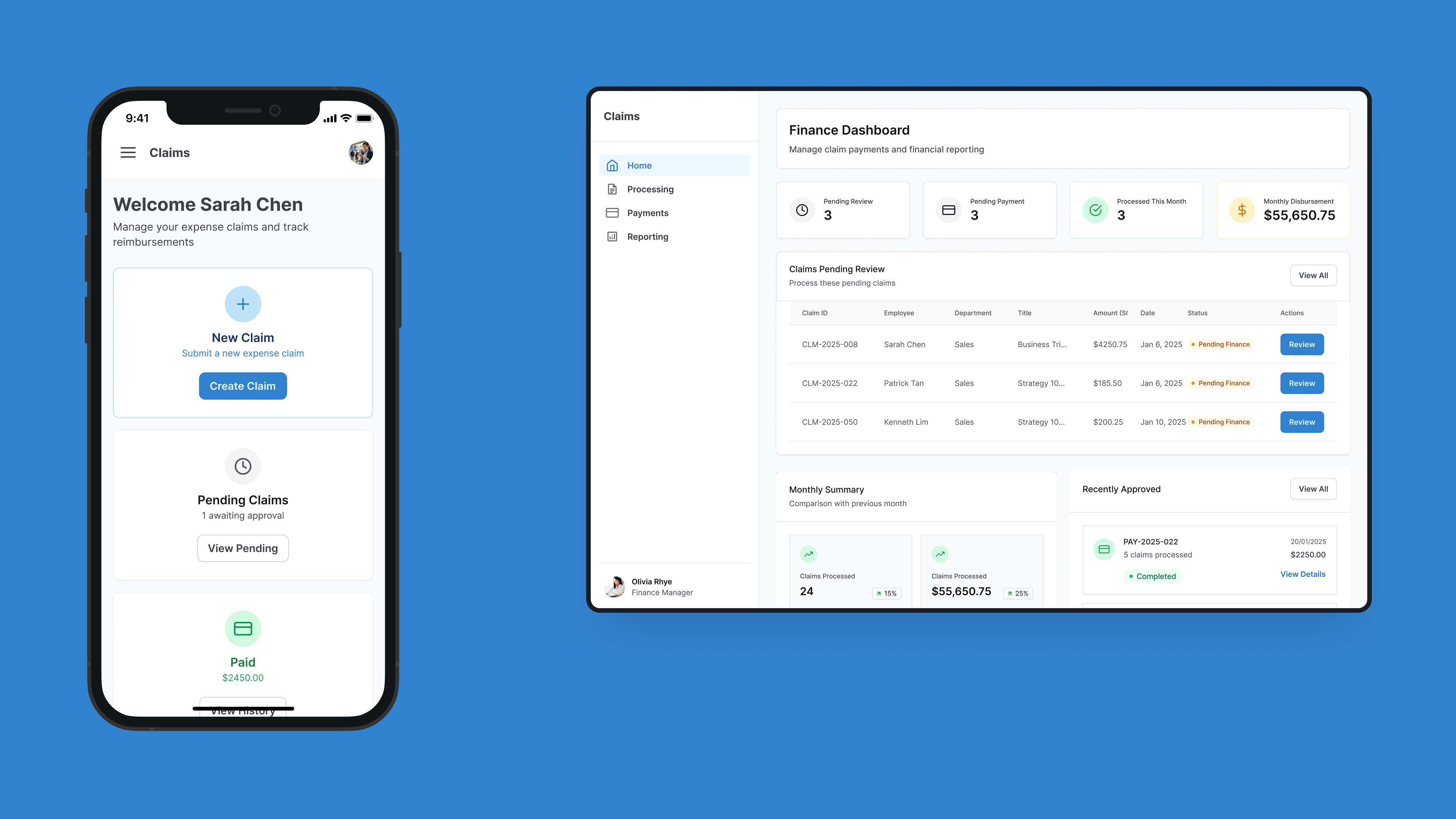
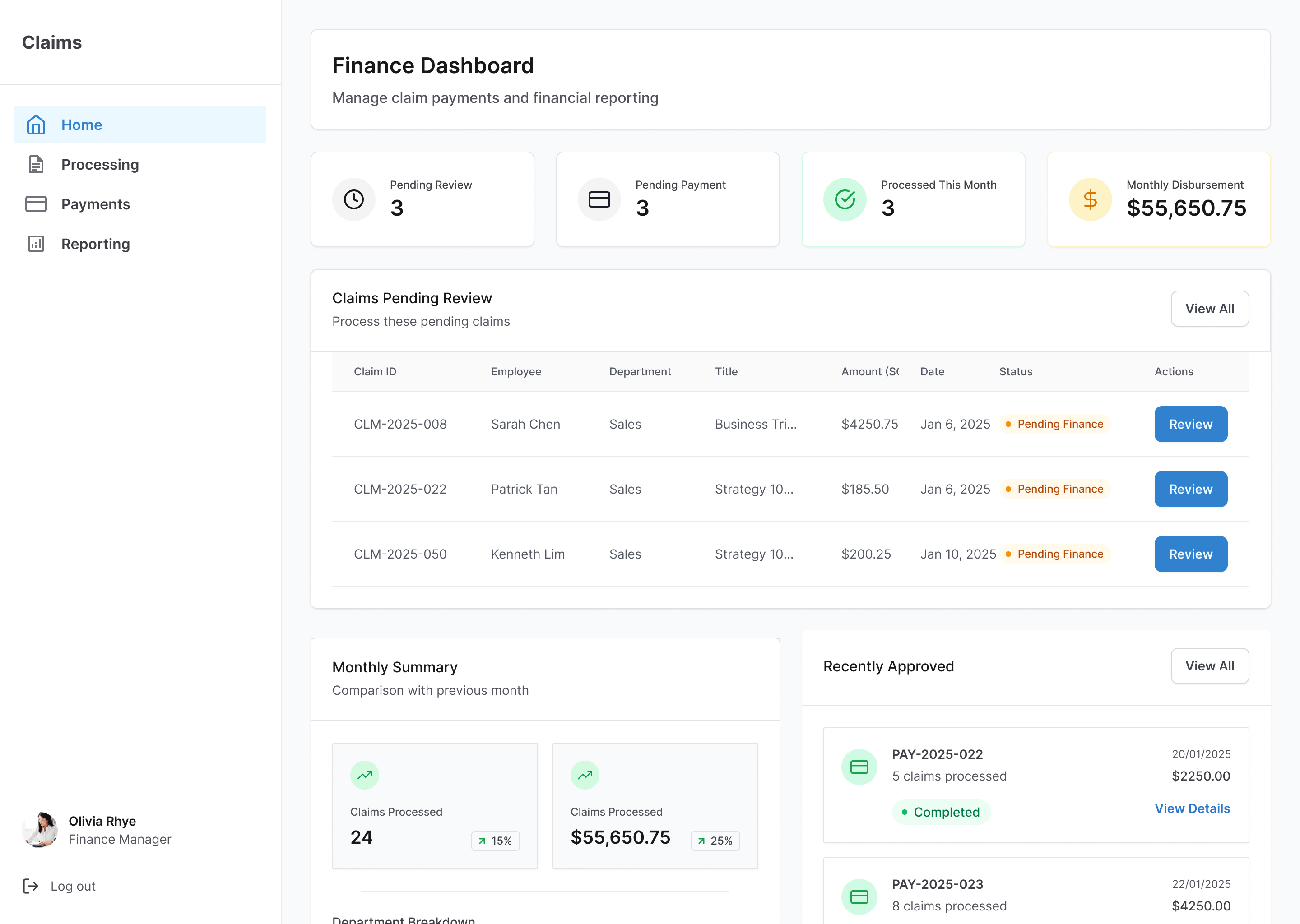
Designed the Finance web dashboard for bulk processing at desk: department-level filtering, batch approval queues, audit trails, and export workflows.
Designed the Manager dual-view mobile interface balancing granular approval detail with big-picture team oversight in a single surface.
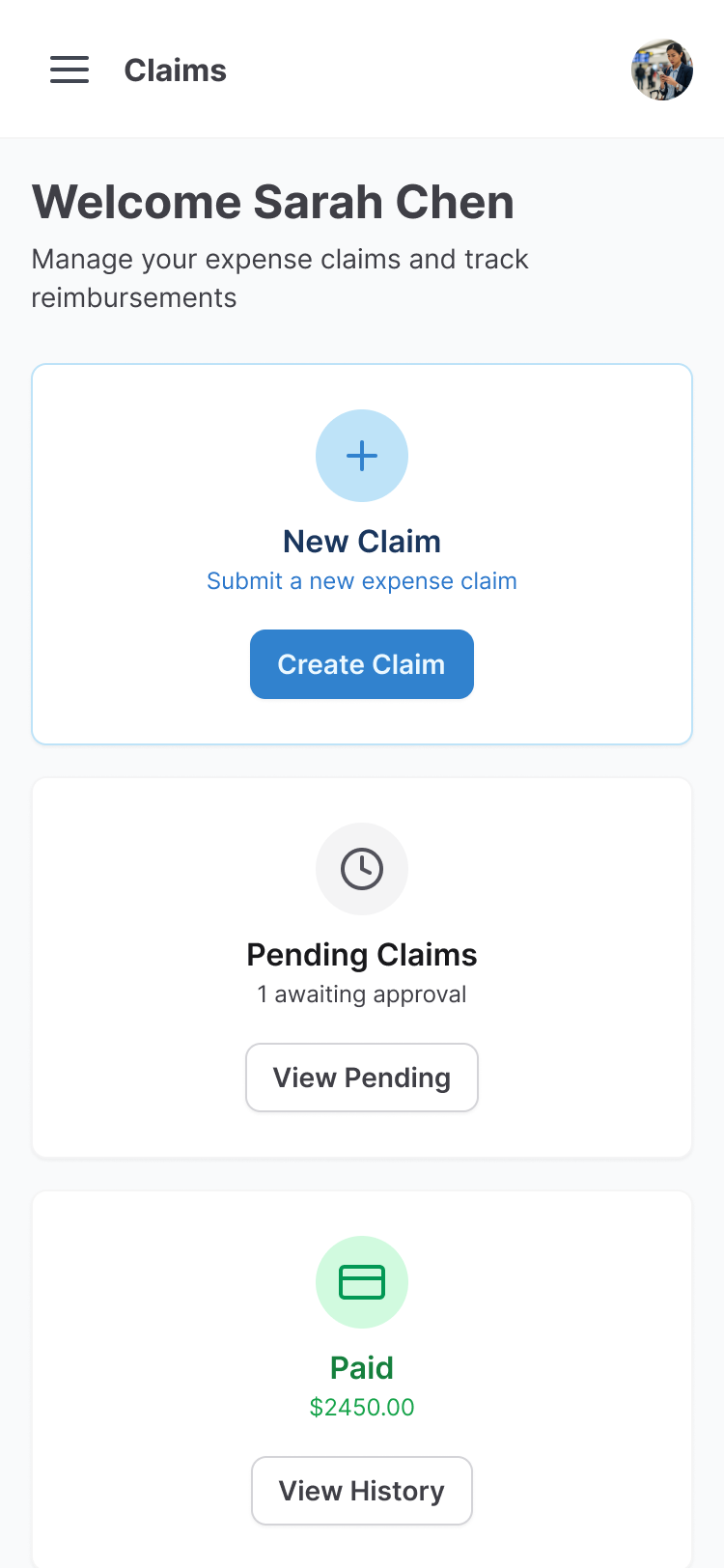
Designed the Employee mobile flow for fast, on-the-go submission: simplified input, receipt upload, and real-time claim status tracking.
Generated design system tokens aligned to Untitled UI and Ant Design, implemented directly in Figma; used Magic Patterns to prototype core feature flows and import as Figma components.
THE CHALLENGE
Three roles with completely different contexts — and a default design instinct that would have failed all of them
Finance processes dozens of claims at a desk, eyes on batch efficiency and audit compliance. Managers toggle between individual approvals and team-level oversight, usually between meetings. Employees submit claims on a phone, post-spend, and just want to know when they'll be reimbursed. Most enterprise tools treat these as filter states on a shared screen. The problem is that visual consistency between roles doesn't produce workflow consistency — it produces three compromised experiences that feel like the same broken tool.
01
Two-week constraint
Research, IA, high-fidelity UI, and prototype across 3 roles and 2 platforms in parallel — no time for sequential waterfall thinking.
02
No design system to inherit
Design tokens had to be generated from Untitled UI and Ant Design and implemented from scratch, alongside the UX work.
THE CENTRAL DESIGN DECISION
Reject the unified interface. Design three entry points for one workflow
The underlying workflow is the same for every role: Submit → Approve → Process. But each role's entry point, information density, and interaction model is optimised for its specific JTBD — not for cross-role familiarity. In multi-role enterprise systems, the instinct toward visual consistency slows task completion. The real work is three distinct interaction models sharing the same underlying workflow logic.
01
Submit
02
Approve
03
Process
Finance
Web dashboard · At a desk, processing at scale
Review and batch-approve claims across departments without losing accuracy or audit trail
Department-level filtering, batch approval queues, audit trails, export
Managers
Mobile (dual-view) · Between meetings, approving on the go
Make fast approval decisions with just enough context — without losing sight of team-level status
Approval logs, comment fields, status filters, team overview toggle
Employees
Mobile (stripped down) · On the go, post-spend
Submit a claim quickly and know exactly where it stands without chasing anyone
Simplified input, receipt upload, real-time status tracking
THE WORK
Research — AI-native simulation
Used Claude and Google AI Studio to simulate end-to-end user research: user interviews across all three roles, insight summaries, customer journey maps, and competitive landscape analysis. The simulation produced usable synthesis — not filler — because the brief was specific enough to constrain the AI's outputs to realistic enterprise constraints.
Design decision — three models, not one
The default approach for multi-role enterprise tools is a unified interface with role-filtered views. That optimises for visual consistency, not workflow efficiency. The deliberate decision here was the opposite: three distinct interaction models sharing a single underlying workflow logic (Submit → Approve → Process), each entry point built around the role's JTBD and context of use.
Execution — tokens, prototypes, handoff
Generated design system tokens from Untitled UI and Ant Design and implemented them directly in Figma. Used Magic Patterns to prototype core feature flows — Finance batch approval, Manager dual-view, Employee submission — and imported as Figma components. Given the two-week constraint, the priority was interaction architecture; branding depth was deliberately traded off.
OUTCOMES
Delivered a full research report, information architecture, high-fidelity mockups across all three roles and both platforms, and an interactive prototype. Projected impact benchmarked against enterprise claims management implementations at similar scale — directional figures, not shipped outcomes.
projected reduction in reimbursement cycle time — benchmarked against enterprise claims implementations at 50,000+ employee scale
projected annual savings — benchmarked against similar enterprise claims automation programmes
each with a distinct interaction model, connected by a single shared workflow logic: Submit → Approve → Process